
Hostmatic Image Analyzer: Boost Bookings with Better Photos

Your Listing Photos Are Costing You Bookings. Here's Proof.
A host in Scottsdale messaged me last week, completely frustrated. "Matt," she said, "I paid $800 for professional photos, my calendar is wide open, and bookings are dead. What gives?" It's a story I hear all the time. On paper, she did everything right. But when I ran her listing through our free Hostmatic Image Analyzer, the problem was obvious. Her "professional" photos scored a 42 out of 100. The AI flagged poor evening light in the primary bedroom and a cluttered kitchen shot that made the space feel small. Her photos were pretty, but they weren't selling the experience. This article isn't just about taking better pictures. It's about understanding which images actually convince a guest to click "Book Now." I'll show you exactly how to use our AI tool to find your weakest photos and give you a data-driven plan to fix them.
Why Your Gut Feeling About Photos is Wrong
For years, the only advice was "get professional photos." That's table stakes now in 2026. Your competition has professional photos, too. The new edge isn't just quality; it's data. Guests make a snap judgment about your property in seconds, primarily based on your first five images. If those images don't create an emotional connection and answer their unspoken questions, they're gone. We've analyzed over a million listing photos at Hostmatic, and the patterns are clear: the highest-converting images aren't always the most artistic. They are the ones that are bright, clear, and accurately represent the space and the experience. The counterintuitive truth is that your favorite photo might be the one that's costing you the most money. You need an objective eye, and that's where AI comes in.
A Step-by-Step Guide to Using the Hostmatic Image Analyzer
We built this tool to take the guesswork out of listing optimization. It's 100% free because we believe every host should have access to this data. Here's how to use it to get actionable insights in under five minutes.
Step 1: Upload Your Listing Photos
First, navigate to the free Hostmatic Image Analyzer. You can simply paste your Airbnb listing URL to import photos automatically, or upload the image files directly from your computer. For your first pass, I recommend analyzing the first 10 photos in your carousel, as these do most of the heavy lifting.
Step 2: Understanding Your "Booking Booster Score"
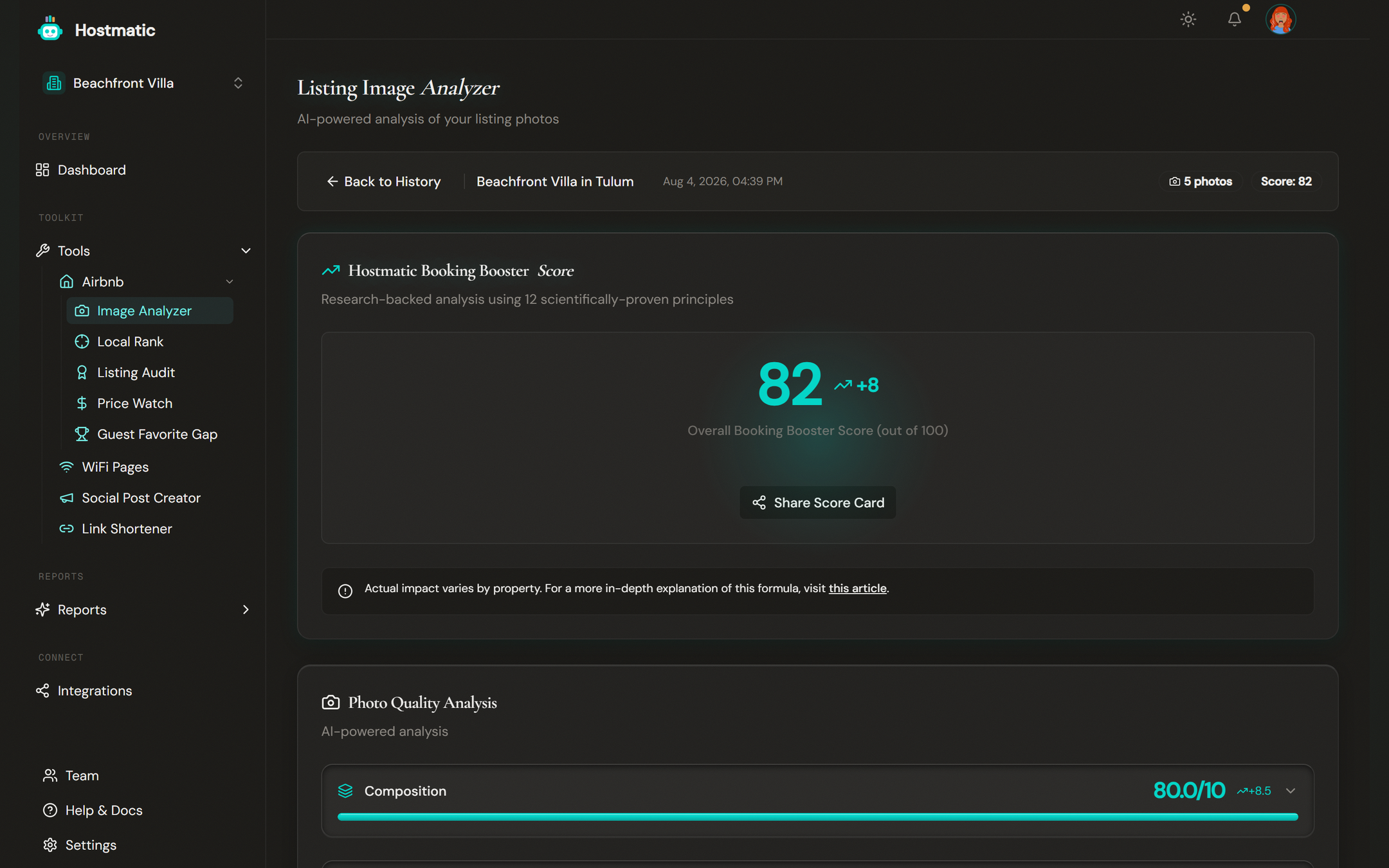
Once the analysis is complete, you'll see a composite "Booking Booster Score." This isn't just a vanity metric. It's a score from 1-100 that estimates the photo's impact on your conversion rate based on key visual elements. A score below 60 suggests significant room for improvement, while anything over 85 is considered excellent. The host from Scottsdale went from a 42 to an 88 after reshooting just three photos.
Step 3: Dive into Individual Photo Scores
The real magic is in the details. Each photo gets scored on several key dimensions:
- Lighting: Is the photo bright and welcoming, or dark and dreary? The AI detects shadows and underexposed areas.
- Composition: Does the photo follow principles of good design? It looks for leading lines, balance, and a clear focal point.
- Clarity & Focus: Is the image sharp or blurry? This is a non-negotiable for guests.
- Staging & Appeal: Does the space look inviting? The AI flags clutter, personal items, and things that detract from the guest experience.
Step 4: Implement the Actionable Recommendations
For each photo, the tool provides specific, plain-English advice. It won't just say "bad lighting." It will say, "This photo appears dark. Try reshooting in the morning with natural light from the window on the left." This is the kind of feedback that helps you make targeted improvements without having to guess.
Common Photo Mistakes the AI Catches Instantly
After running thousands of listings through the analyzer, we see the same mistakes over and over. Here are the most common issues the AI flags and how to fix them.
The "Cozy" but Dark Bedroom
AI Diagnosis: Low lighting score (3/10). The room feels smaller and less inviting than it is.
The Fix: Shoot during midday. Open all blinds and curtains. Turn on every single lamp, even if it's bright outside. This layering of light creates warmth and depth that guests respond to. According to a Forbes analysis of visual marketing, well-lit visuals are processed more easily and create a more positive impression.
The Lived-In Look (aka Clutter)
AI Diagnosis: Low staging & appeal score (4/10). Detects excessive personal items, cluttered counters, or distracting objects.
The Fix: Depersonalize ruthlessly. Remove fridge magnets, family photos, and half-empty shampoo bottles from the shower. A clean, hotel-like presentation allows guests to imagine themselves in the space. As Airbnb's own guide to photography suggests, less is more.

Beyond the Score: Proving the ROI of Your New Photos
Fixing your photos is great, but how do you know it actually worked? This is the step most hosts miss. Don't just upload new photos and hope for the best. Track the impact.
- Analyze & Improve: Run your current photos through the analyzer and make the recommended changes.
- Update Everywhere: Upload your new, higher-scoring photos to Airbnb, Vrbo, Booking.com, and your direct booking site.
- Track Your Rank: This is critical. Higher quality photos lead to a better click-through rate from search results. This signals to the algorithms that your listing is appealing, which can improve your ranking. I always tell hosts to track your listing rank using a tool like our image analyzer to see if the new photos move you up the page.
- Monitor Bookings: Compare your booking pace and conversion rate for the 30 days after the photo update to the 30 days prior. The results should speak for themselves.
Your Action Plan for Today
Stop guessing if your photos are good enough. Data has the answer. Here's your plan:
- Run your first five photos through the free Hostmatic Image Analyzer right now. It takes two minutes.
- Identify your lowest-scoring photo. That's your top priority.
- Read the AI's recommendation and create a plan to reshoot that one image.
- Start small. Improving just one or two key photos can have a noticeable impact on your listing's performance.
Optimizing your listing photos is one of the highest-leverage activities you can do for your business. It costs little to nothing but can directly impact your visibility, click-through rate, and ultimately, your revenue. The tools to do it effectively are right at your fingertips.
Want to dive into your booking analytics and uncover what drives bookings?
Get StartedNewsletter
Get hosting tips in your inbox
Strategies, trends, and insights. No spam.