
How to Access
Click Link Shortener in the sidebar, under Tools. The page title is "URL Shortener."
Step-by-Step: Create a Short Link
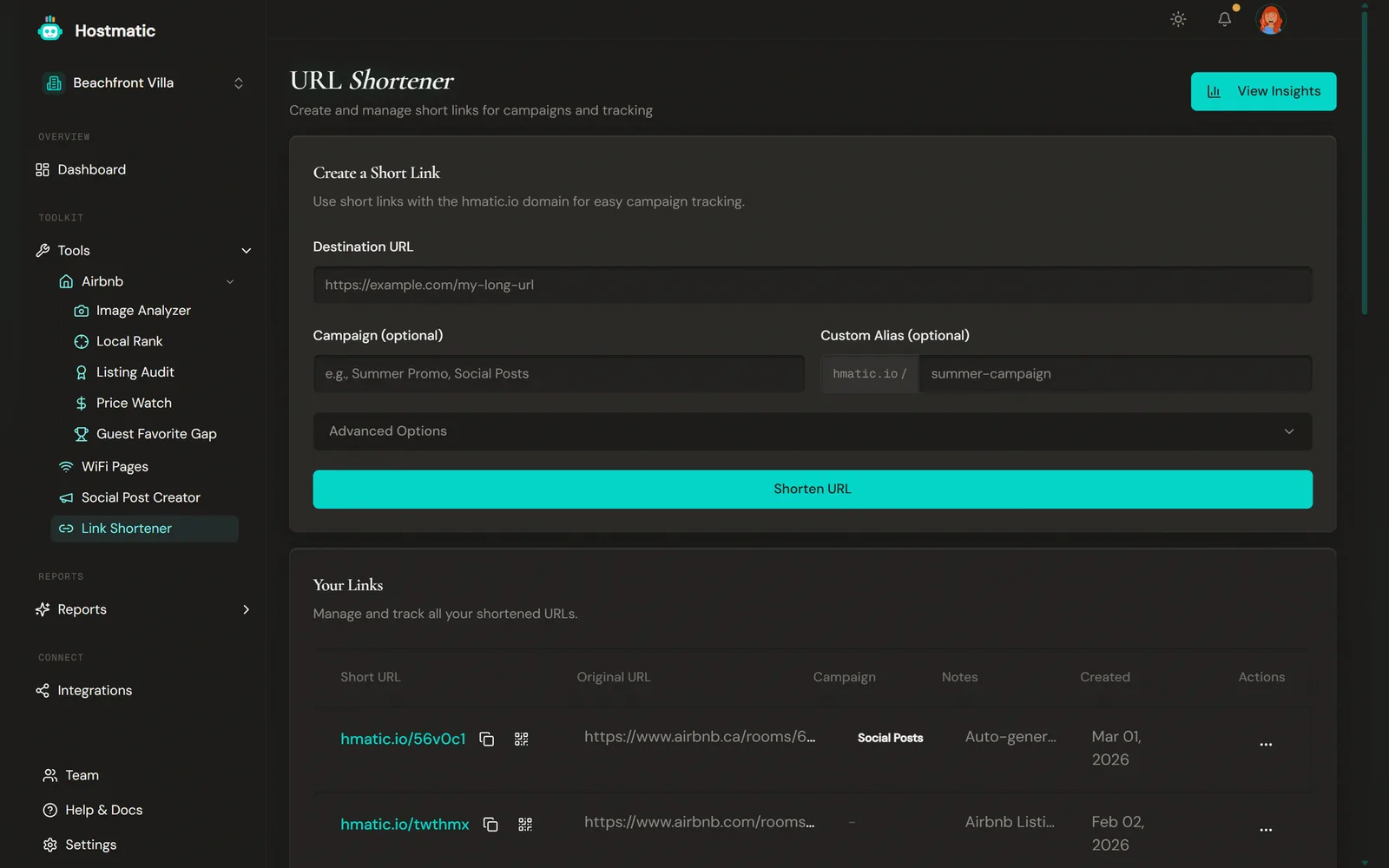
The Create a Short Link card contains the link creation form.
1. Enter the Destination URL
In the Destination URL field (placeholder: https://example.com/my-long-url), paste the full URL you want to shorten — your Airbnb listing, direct booking page, or any web page. Destinations flagged as unsafe are refused with an "Unsafe destination" message.
2. Add a Campaign Tag (Optional)
In the Campaign (optional) field (placeholder: "e.g., Summer Promo, Social Posts"), type a campaign name to group this link with others. Max 100 characters. Autocomplete suggestions appear based on your existing campaigns.
3. Set a Custom Alias (Optional)
In the Custom Alias (optional) field, type a memorable slug. The prefix "hmatic.io /" is shown to the left of the field. For example, typing "beach-house" creates hmatic.io/beach-house.
Rules: letters, numbers, hyphens, and underscores only. Max 20 characters. Availability is checked as you type — you'll see "Available", or a message if the alias is taken, reserved or not allowed. Shorten URL stays disabled until the alias clears.
4. Advanced Options
Click the Advanced Options collapsible section to expand additional fields:
Notes (optional, max 200 characters) — Add internal notes about the link's purpose.
UTM Tagging — Tag the destination URL above with UTM parameters for campaign tracking.
- Source — e.g., instagram
- Medium — e.g., social
- UTM Campaign — e.g., summer-promo
- Term (optional) — e.g., vacation+rental
- Content (optional) — e.g., header_cta
Preset buttons — Instagram Bio Link, Email Newsletter, Google My Business, Facebook Ad — fill Source and Medium for you. Click a preset again to clear it. Values are lowercased, spaces become hyphens, and other symbols are removed, so "vacation+rental" becomes "vacationrental". Once you fill a UTM field and the destination URL is valid, a Final URL Preview shows the tagged link.
5. Create the Link
Click Shorten URL. Your shortened URL appears in a highlighted card. Click the copy icon next to it — a "Copied to clipboard!" toast notification confirms it. Team members with the Viewer role can't create links.
Your Links Table
Below the creation form, the Your Links card shows the current property's links, plus older links that aren't tagged to a property:
- Short URL — click it to open the link. The icons beside it copy the link or show its QR code
- Original URL
- Campaign
- Notes — hover a note to see all of it
- Created
- Actions — View Analytics, Edit Notes, Delete
The table shows 10 rows by default; past 10 links you can set Rows per page to 10, 25, 50, 75 or 100. The Campaign, Notes and Created columns are hidden on narrower screens.
You can't change a link's destination, alias or campaign after it's created. Only the notes can be edited. Deleting a link also removes its analytics.
QR Codes
Click the QR icon next to any link to generate its QR code, then Copy QR Code or Download it as a 300×300 PNG. The code carries the Hostmatic logo in the center; on Pro, the logo is removed so you can use the code with your own branding. Scans are counted separately from direct clicks.
View Analytics
Click the View Insights button (with a chart icon) in the top-right of the page header. This opens the Marketing report under Reports, where Top Links lists clicks per link with its campaign and channel. For one link's full breakdown, use Actions → View Analytics on the URL Shortener page (Pro).
What Gets Tracked
For every click, Hostmatic records:
- Link clicks and QR scans, on every plan
- On Pro: unique and returning visitors (server-side fingerprinting), device type, browser, country and referrer
Bots, link-preview crawlers and repeated clicks from the same IP address in quick succession are filtered out.
Link Limits
Free plans can create 100 links, Weekend Host 250 and Pro 1,000, counted across your whole account rather than per property. When you reach the limit you'll see a "Link Limit Reached" message with the option to upgrade.