
Requires a paid plan. A lock icon appears next to Bookings in the sidebar for Free-plan accounts. PMS connections (Guesty, OwnerRez) require Weekend Host or higher.
How to Access
- In the sidebar, click Reports to expand the menu
- Under the Bookings divider, click Bookings
Route: /insights/bookings. The page heading reads Bookings Report, with an "About this page" help icon beside it.
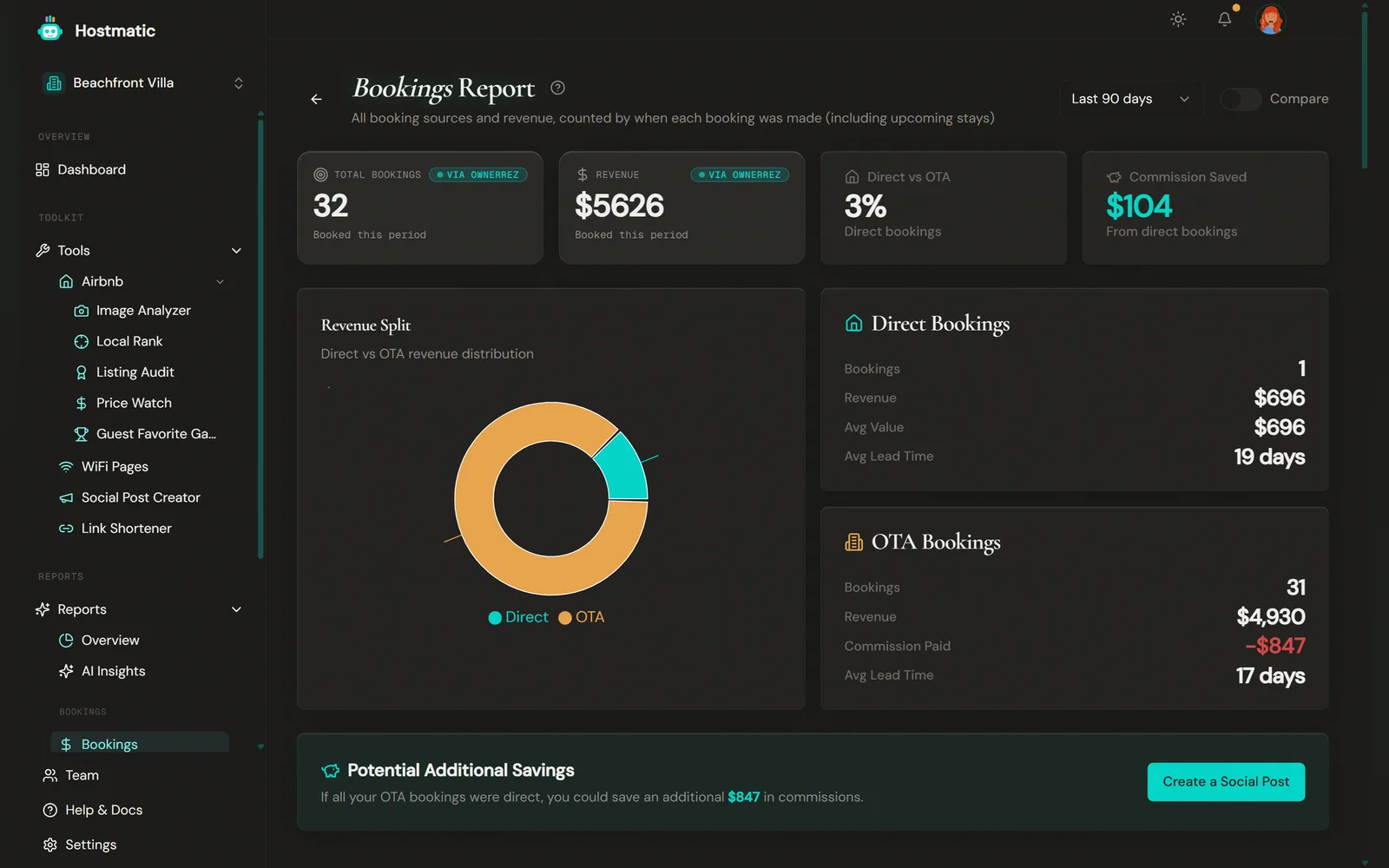
What You'll See on the Page
Headline KPIs
- Total Bookings and Revenue for the selected period — counted by the date each booking was made, including upcoming stays
- Direct vs OTA — the percentage of bookings that were direct
- Commission Saved — the commission you avoided by not routing those bookings through an OTA, estimated as direct revenue × 15%
On Pro Host, the Compare toggle adds a prior-period comparison to these four tiles only. The cohort charts always show the selected period.
Revenue Split
A Revenue Split donut chart of Direct vs OTA revenue for the period, alongside detail cards for each side: Bookings, Revenue, Avg Value and Avg Lead Time for Direct; Bookings, Revenue, commission paid and Avg Lead Time for OTA.
When you have OTA bookings with revenue, a Potential Additional Savings callout shows the estimated commission on them (15%, or 18% for Booking.com) — what you'd save if those bookings had been direct. It includes a Create a Social Post button.
Website Checkout Tracking *(PMS connected, with at least one direct booking)*
Shows Tracked — the share of direct bookings matched to a GA4 purchase event whose transaction_id equals the PMS confirmation code — and Matched Revenue. If purchase tracking isn't set up, you get a Set up purchase tracking button instead. OTA and phone/manual bookings can never match, so 100% is not the goal.
Bookings by Source
Every classified booking source (see labeling below) with its booking count and revenue for the period.
OTA Platform Performance
Per-platform breakdown (Airbnb, Booking.com, Vrbo, Expedia, TripAdvisor, Agoda, etc.) showing Clicks, Bookings, Revenue, Ratio and Avg Value. This is the head-to-head comparison across your OTA channels.
Clicks only counts clicks on Hostmatic tracking links that point to that OTA, so it reads 0 unless you've made such links. Ratio is tracked clicks per booking, shown as "12:1", or a dash when there are no tracked clicks. An asterisk (*) on Revenue and Avg Value means only priced bookings are counted — Airbnb iCal rows carry no prices.
Airbnb Calendar (iCal) Section *(shown when Airbnb is connected)*
This section covers Airbnb iCal bookings only. Airbnb bookings that arrive through a PMS appear in Bookings by Source, OTA Platform Performance and Channel Mix instead.
- KPIs: Total Bookings, Total Nights, Upcoming, Avg Occupancy, Avg Lead Time
- Airbnb Calendar Performance by Listing — a per-listing table (bookings, nights, occupancy, clicks)
- Recent Airbnb Calendar Bookings — upcoming and current reservations pulled from your Airbnb calendars (Listing, Check-In, Check-Out, Nights, Status)
- Weekly Bookings — a bar chart of Airbnb booking volume over time
Booking Cohorts *(when cohort data is available)*
- Lead-Time Distribution — how far in advance bookings were made, as a table (Lead Time, Bookings, Revenue, Share) and bar chart
- Booking Pace — booked-month vs. stay-month, so you can see how far ahead your calendar is filling
- Channel Mix (Cohorts) — bookings, revenue, average ADR, and share by channel
Note: Lead-time and booking-pace figures are exact for bookings from a connected PMS (Guesty, OwnerRez) and use a first-seen approximation for Airbnb iCal bookings, since iCal feeds don't expose the original booking date — only when Hostmatic first observed the reservation in the calendar.
Direct vs. OTA Labeling
Booking sources are normalized consistently across the app. The raw source values differ by which PMS/integration you have connected — the table below shows the mapping to the label you'll actually see:
| Raw source | Label shown | Comes from |
|---|---|---|
BE-API / booking-engine variants |
Direct (Booking Engine) | Guesty (its own booking-engine bookings) |
website, direct, widget, hosted website, inquiry |
Direct | OwnerRez and other connected sources |
OwnerRez's own site/listing (ownerrez) |
Direct (OwnerRez) | OwnerRez |
manual |
Manual (Direct) | Manually entered bookings |
| Airbnb, Booking.com, Vrbo, Expedia, TripAdvisor, Agoda, Golightly | OTA platform name (e.g. Airbnb) | Guesty, OwnerRez, or Airbnb iCal |
Anything Hostmatic doesn't recognise is shown exactly as your source reported it.
Note:
BE-APIis a Guesty-specific booking-engine code — you won't see it on OwnerRez or Airbnb iCal. OwnerRez reports direct bookings under its own values, shown as Direct or Direct (OwnerRez). Airbnb iCal contains only Airbnb bookings, so it has no direct bookings at all.
Using Bookings Report Data
Commission Optimization
Compare the Direct and OTA detail cards side by side, and check the same cards for earlier periods (or turn on Compare on Pro Host). If Direct revenue and bookings are trending up, you may be able to shift marketing spend away from OTA-dependent channels.
Spot a Weak Platform
In OTA Platform Performance, a platform with a lot of tracked clicks but a poor ratio usually means the listing itself needs work on that platform — check Tools → Airbnb → Image Analyzer or Listing Audit.
Read Booking Pace, Not Just Volume
Use the Booking Pace chart to see whether your calendar is filling further out than it used to (a good sign for pricing power) or filling later and later (a warning sign worth investigating).
Requirements
Connect at least one booking data source from Integrations:
- A PMS — Guesty or OwnerRez (Weekend Host+) — richest data: exact lead time, revenue, commission, and platform attribution, including per-platform OTA breakdowns for Vrbo, Booking.com and the rest
- Airbnb Calendars (iCal) — booking dates, nights, and occupancy, with lead time approximated from first-seen date and no prices
The date range lists Last 7 / 14 / 30 / 90 days, 6 months and 1 year on every plan. History beyond your plan's limit is simply not synced.
Without a connected PMS, a Connect Your PMS to See Booking Data card appears at the bottom of the page. Airbnb calendar data still shows above it. PMS bookings count toward the totals only while a PMS is connected.