
How to Access
- In the sidebar, click Reports to expand the menu
- Under the Marketing divider, click Marketing
Route: /insights/marketing. The page heading reads Marketing Report, with an "About this page" help icon beside it. Available on all plans — some sections below are gated to specific plans (noted inline). On Free, GA4 and PMS connections aren't available, so most sections stay empty and only your short-link data shows.
What You'll See on the Page
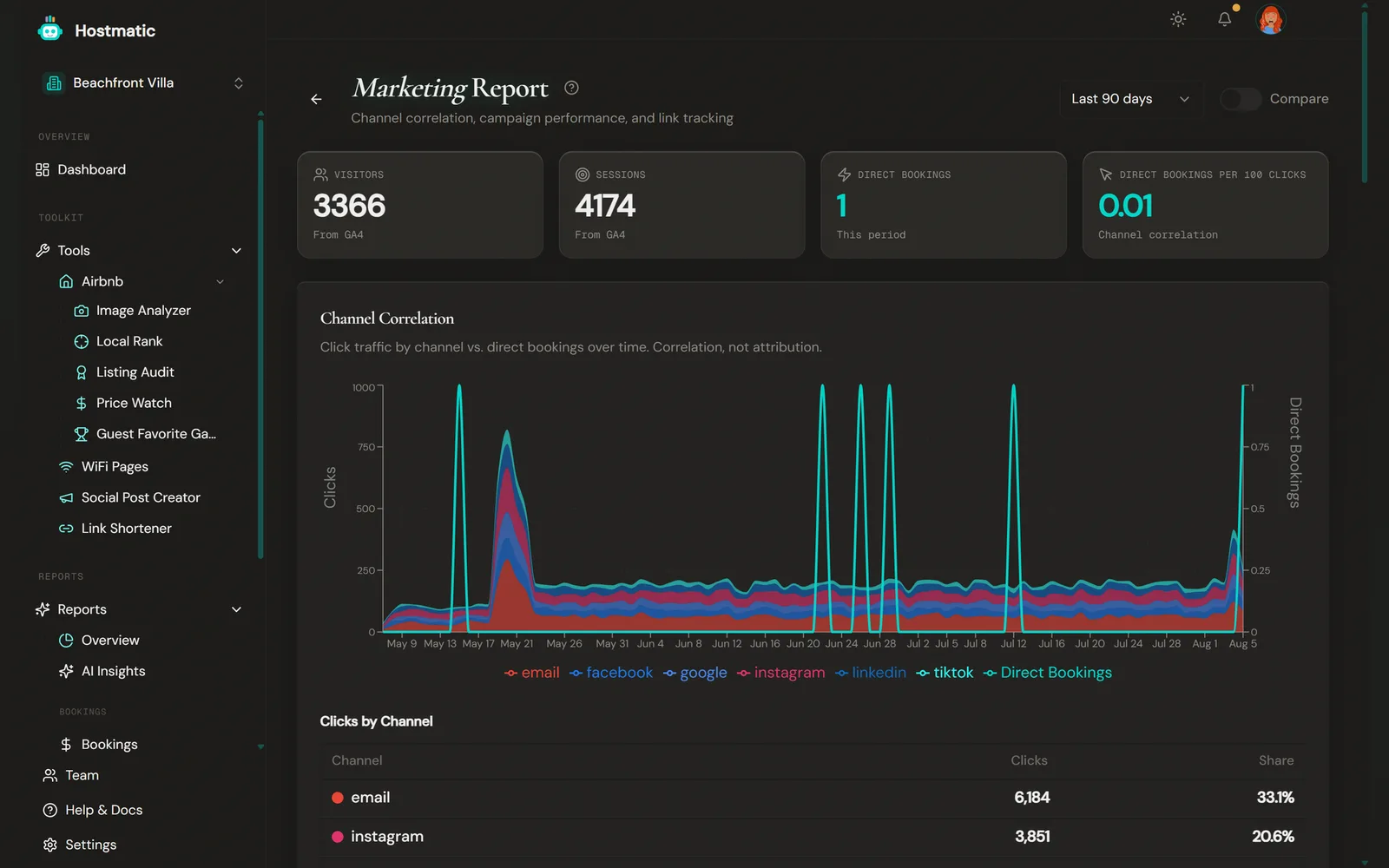
Headline KPIs
- Visitors and Sessions — from GA4, for the selected date range
- Direct Bookings — confirmed PMS reservations created in the range whose source classifies as direct (see labeling below); cancellations are excluded
- Direct Bookings per 100 Clicks — a correlation ratio, not a conversion rate (see the honesty note below)
On Pro Host, the Compare toggle adds a prior-period comparison to these tiles, Clicks by Channel, Top Campaigns, Campaign → Bookings and Top Links. The correlation chart, social, ads, posts and Attribution Honesty always show the selected period.
Channel Correlation (hero section)
A time-series chart stacking clicks on your Hostmatic short links by channel (instagram, facebook, email, google, tiktok, pinterest, linkedin, twitter, direct/other, plus any other utm_source you use) against a line for direct bookings on the same dates. Each link's channel comes from its utm_source, or its campaign tag if it has no source. Below it, a Clicks by Channel table shows each channel's clicks and share of total clicks.
This section is explicitly labeled correlation, not attribution — the chart lets you eyeball whether a spike in a channel's clicks lines up with a spike in bookings a few days later, but it does not claim a causal link. A note at the bottom of the card restates this honestly.
Top Campaigns *(requires Weekend Host or higher)*
Your top 10 UTM campaigns as GA4 records them, sorted by conversions, with source/medium, visitors, sessions, conversions and conversion rate. Hostmatic short links show up here once their UTM-tagged visits reach GA4. On a plan without campaign access, an upgrade prompt replaces the table. The section is hidden entirely when there is no campaign data.
Campaign → Bookings
The most direct answer to "which campaign drove bookings". It appears when there are bookings to match, and summarises as "X exact, Y probable, Z unattributed of N bookings". Per campaign it lists Source, Exact, Probable and Revenue.
- Exact — a GA4 purchase
transaction_idmatched the booking confirmation code. - Probable — a tracked short-link click in the 3 days before the booking.
Top Links
Your top 10 shortened links by clicks in the period (alias, campaign, channel, clicks), with a total link and click count — "Top N of M shortened links (X total clicks)".
Organic Social Traffic *(requires Weekend Host or higher)*
Visitors and sessions from GA4, broken out by social platform. This is organic traffic to your site that GA4 attributes to a social referrer. Paid mediums (cpc, paid social, display) are excluded.
Note: Organic social traffic comes from GA4. There's no Meta connection to set up. If GA4 is connected and visitors arrive from social sites, they show up here automatically. To publish posts, connect Social Accounts on the Integrations page and use the Social Post Creator tool.
Below the organic table you'll also see:
- Ad Performance — spend, impressions, reach, clicks, conversions, plus blended ROAS and cost per booking, across your ad accounts rather than per property. With no ad account connected, the card still shows, with a "Connect an ad account" link. Connecting ad accounts requires Pro Host (up to 2).
- Post-Level Performance — engagement, plus the clicks, bookings and revenue linked to each post published through Hostmatic, with best-engagement and best-conversion callouts. Requires Weekend Host or higher.
Attribution Honesty *(shown when a PMS — Guesty or OwnerRez — is connected)*
A candid self-check, not a polished KPI:
- Bookings with Contact Info — how many direct bookings captured a guest email, and what percentage of direct bookings that represents
- GA4 Purchase Tracking — whether a GA4
purchaseevent with atransaction_idhas been detected on your booking confirmation page. The badge reads Active or Not Detected, with a "Set it up" link.
The card also shows a Last synced date.
If GA4 is connected but purchase tracking isn't detected, a banner near the top of the page — "See which campaign drove each booking" — links to Open the Event Setup tool →. On OwnerRez you paste your GA4 Measurement ID instead of installing a snippet.
Direct vs. OTA Labeling
Booking-source labels are normalized consistently across the app. (Traffic channels use a separate mapping — instagram, facebook, email, google and so on.) The raw source values differ by which PMS/integration you have connected — the table below shows the mapping to the label you'll actually see:
| Raw source | Label shown | Comes from |
|---|---|---|
BE-API / booking-engine variants |
Direct (Booking Engine) | Guesty (its own booking-engine bookings) |
website, direct, widget, hosted website, inquiry |
Direct | OwnerRez and other connected sources |
OwnerRez's own site/listing (ownerrez) |
Direct (OwnerRez) | OwnerRez |
manual |
Manual (Direct) | Manually entered bookings |
| Airbnb, Booking.com, Vrbo, Expedia, TripAdvisor, Agoda, Golightly | OTA platform name (e.g. Airbnb) | Guesty, OwnerRez, or Airbnb iCal |
Note:
BE-APIis a Guesty-specific booking-engine code — you won't see it on OwnerRez or Airbnb iCal. OwnerRez reports direct bookings under its own values, shown as Direct or Direct (OwnerRez). Airbnb iCal contains only Airbnb bookings, so it has no direct bookings.
Using Marketing Report Data
Spot Channel-Level Winners
Look at the Clicks by Channel table and the correlation chart together. A channel with a small click share but a booking spike that consistently follows its click spikes is worth more investment than a channel with high volume and no discernible booking pattern.
Decide What to Repeat
In Top Campaigns, compare the Rate column, not just sessions. The table is fixed in order of conversions and can't be re-sorted, so read the rates across rows. A campaign with 100 sessions and 4 conversions (4%) is usually a better playbook to repeat than one with 1,000 sessions and 5 conversions (0.5%).
Tie Clicks to Revenue
Use Top Links to find which specific placements (Instagram bio, email footer, Airbnb host profile) are driving clicks, then cross-reference with the campaign each link is tagged to in the Campaign column.
Close the Attribution Gap
If the Attribution Honesty card shows low contact-capture or no purchase tracking, that's your next fix — not a data bug. Add a GA4 purchase event with transaction_id on your confirmation page, and start capturing guest contact info on direct bookings.
Requirements
- GA4 connected (Integrations, Weekend Host+) — required for visitors, sessions, Top Campaigns and organic social traffic
- At least one Hostmatic short link — required for Top Links and the channel-correlation chart
- A PMS connected (Guesty or OwnerRez, Weekend Host+) — required for Direct Bookings, Campaign → Bookings and the Attribution Honesty section
- Plan gates: Top Campaigns requires Weekend Host+; the social section (Organic Social, Ad Performance, Post-Level Performance) requires Weekend Host+; connecting ad accounts requires Pro Host; Compare requires Pro Host