
How to Access
- In the sidebar, click Reports to expand the menu
- Click Funnel Analysis. It's listed under the Marketing label in Reports, right after Marketing.
Route: /insights/funnel-analysis. The page opens on every plan, but it runs entirely on GA4, and connecting GA4 needs Weekend Host or Pro Host. On Free the page stays empty.
The ? button next to the page title opens "About this page", where you can read the full guide or ask the assistant.
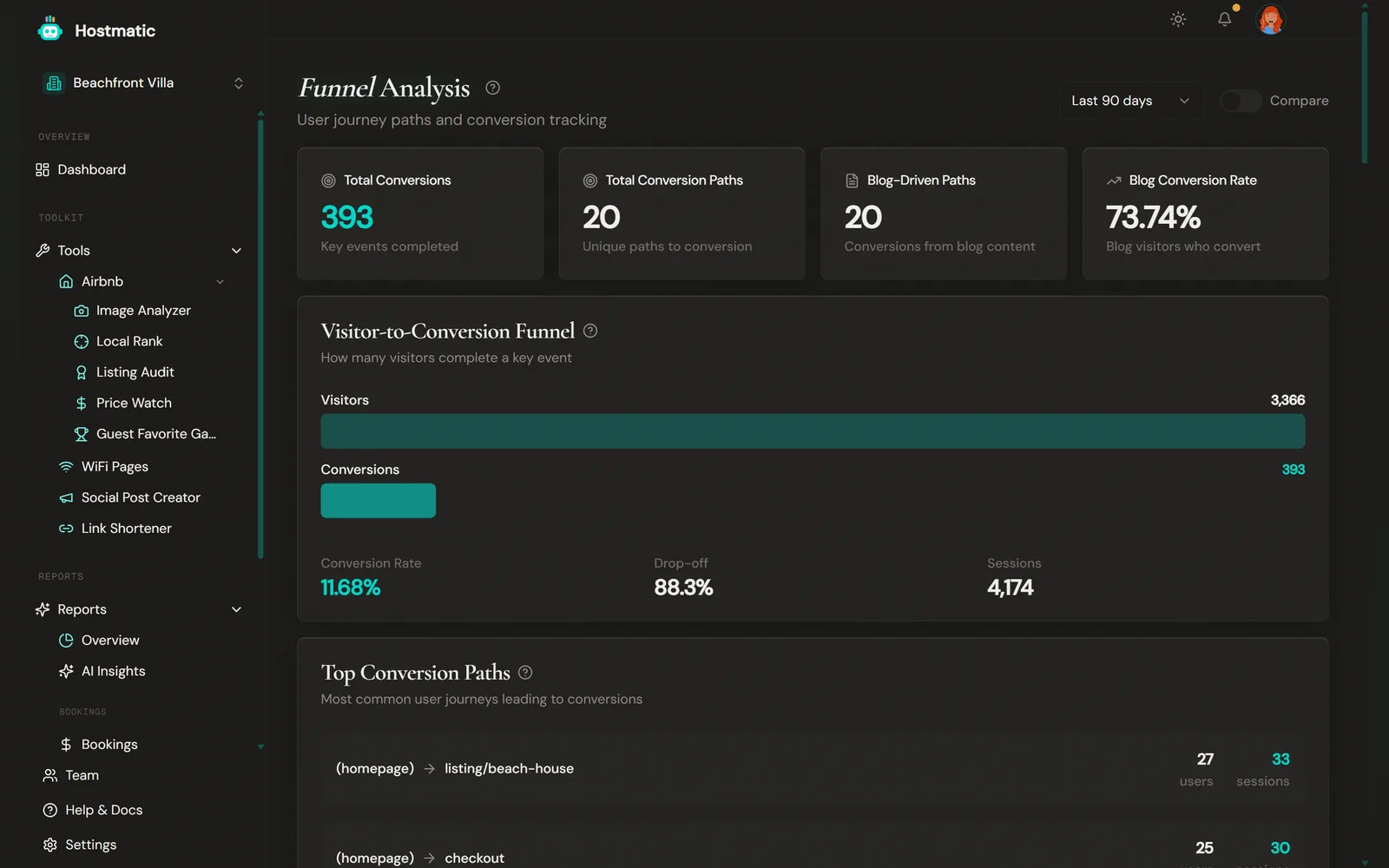
What You'll See on the Page
At the top there's a date-range selector (Last 7 / 14 / 30 / 90 days, plus Last 6 months on Weekend Host and Last year on Pro Host) and, on Pro Host, a Compare toggle. Compare adds the previous period's figures and % change to the four summary cards and the Visitor-to-Conversion Funnel. The other sections always show the selected period only.
Summary Stats
Four cards give you the headline numbers:
| Card | What It Shows |
|---|---|
| Total Conversions | Key events completed in the period |
| Total Conversion Paths | Landing page → conversion page pairs that ended in a conversion (up to 20) |
| Blog-Driven Paths | Conversion paths whose landing page is a blog page (up to 20) |
| Blog Conversion Rate | The share of blog visitors who go on to convert |
Visitor-to-Conversion Funnel
Visitors from GA4 against conversions (key events), with Conversion Rate, Drop-off and Sessions.
Event-Step Funnel
An ordered GA4 funnel: Visitors → Engaged → Converted. Each step counts only users who completed the step before it, and an Overall Conversion figure sits alongside it. If no conversion event is set up, you'll see a Set up conversion tracking → link instead.
Top Conversion Paths
The most frequent page-to-page journeys users take before completing a conversion event, each showing the number of users and sessions. Each path is a landing page → conversion page pair from GA4 session data. The top 10 are shown.
Conversions by Source
Conversions grouped by traffic source / medium, with revenue when GA4 reports it.
Blog to Conversion Paths
When you have blog content, this section highlights the journeys that start on a blog page and end in a conversion — a direct read on the ROI of your content marketing.
Landing Page Performance
A bar chart comparing the conversion rate of each landing page (entry point). It shows up to 15 landing pages that had at least one conversion, ordered by traffic. Blog pages are highlighted so you can see how content pages stack up against the rest of your site.
Highest Converting Pages
A ranked list of your top 10 landing pages by conversion rate, with each page's total users and conversions. Pages are flagged high-performing at 5%+, moderate at 2–5%, and low below 2%.
How to Use This Data
- Find your best entry points — In Landing Page Performance and Highest Converting Pages, spot which pages turn visitors into conversions and send more traffic there.
- Measure your content — Use Blog-Driven Paths and Blog Conversion Rate to see whether your blog is actually driving conversions, not just traffic.
- Follow the common journeys — Top Conversion Paths shows the routes people actually take; make those routes faster and clearer.
- Compare periods (Pro) — Turn on Compare to check whether changes you made moved the numbers.
Data Source
Funnel Analysis is powered entirely by Google Analytics (GA4) — conversion paths and blog analytics are derived from your GA4 session and event data. Connect GA4 from the Integrations page in the sidebar. If Top Conversion Paths or Landing Page Performance says there's no data, sync your GA4 data first. Other sections stay hidden until there's data for them.
Note: For the high-level visitor → sessions → bookings funnel, see the Overview page (
/insights). Funnel Analysis focuses on the page-level journeys and landing-page conversion behind that funnel.