
How to Access
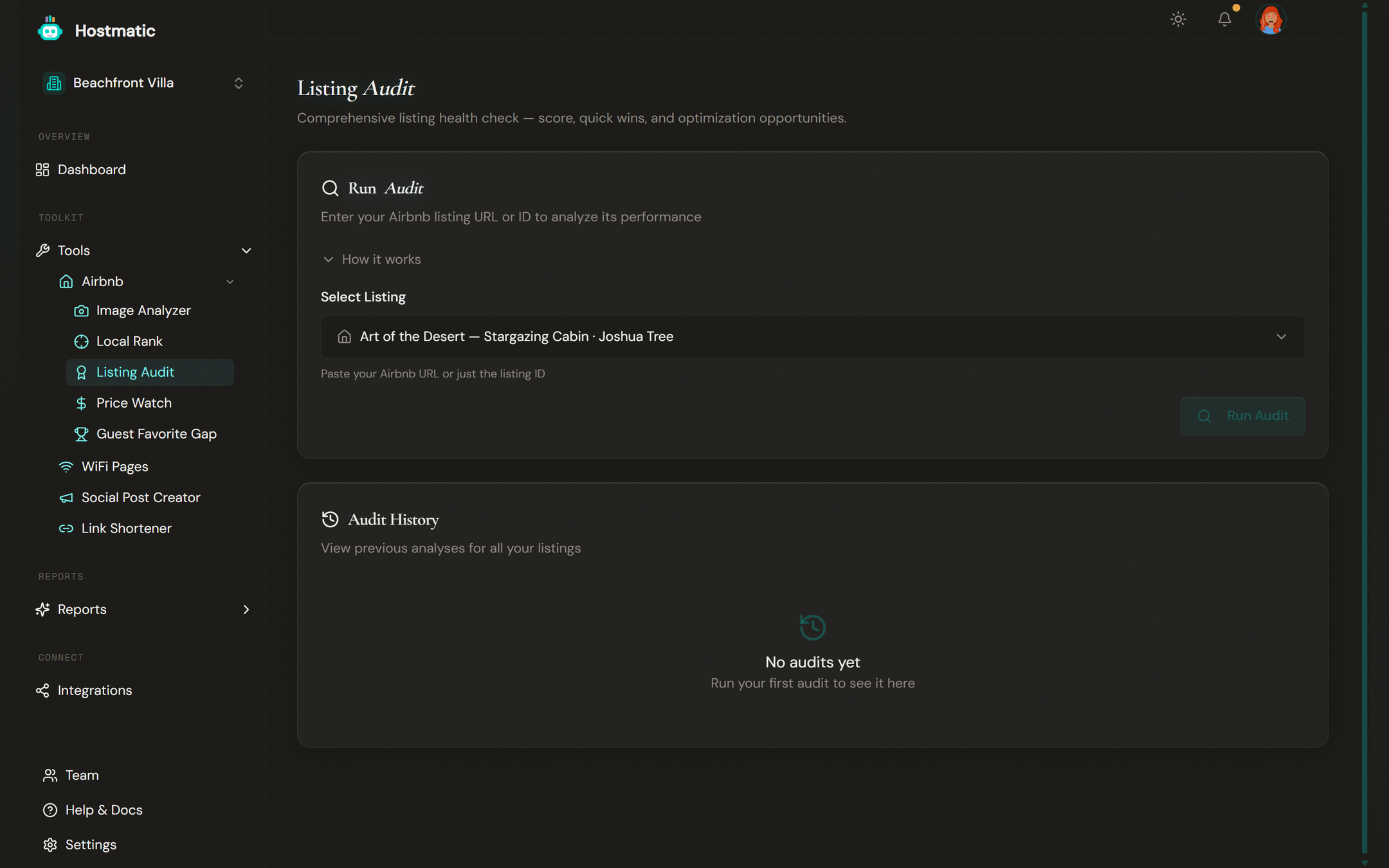
In the sidebar under Tools → Airbnb, click Listing Audit (or pick it from the Airbnb tools hub).
What an Audit Includes
Every audit produces:
- Overall Score (0–100; teal 80+, amber 60–79, red under 60) shown in a large score ring, with a ± N · confidence pill. If too few dimensions could be measured it's labelled Preliminary Score.
- Section sub-scores for Photos, Position, Reviews, Complete, and Pricing. A tile with no data shows what to run to fill it, e.g. Run Image Analyzer →, or why it's locked, e.g. Unlocks at 3+ reviews.
- Quick Wins — a prioritized list of the highest-impact issues, each with its impact, effort, and the evidence behind it
- Title & Description Scorer — scores your title and description live as you edit them
- Per-section notes explaining what was scored well, what was scored down, and why. Sections are collapsible: Photos & Images, Comparable Rank / Search Position, Listing Completeness, and What guests are saying.
Quick Wins appear right below the scores.
Step-by-Step: Run an Audit
1. Choose a Listing
Pick a listing from the dropdown. It lists every Airbnb listing you've saved or scanned before, most recently scanned first. To audit a listing you haven't saved yet, click Add a new listing… and enter its Airbnb Listing ID or URL.
2. Start the Audit
Click Run Audit. Progress messages show while it runs — Analyzing listing…, Checking position…, Reviewing reviews…, Generating quick wins…. You can leave the page; the audit keeps running and picks up where it left off when you come back.
3. Review the Report
When the run completes, the report opens on the page, with Back to History to return. You'll see the score ring, Quick Wins, and a card per section. The footer shows the credits charged and how long the run took, plus a Re-run Audit button.
To see past reports, click View History on the listing's row, then View Full Report on any run. Reopening a past report is free.
Credits
| Operation | Credits |
|---|---|
| Fresh audit | 10 |
| Audit reusing an Image Analyzer scan from the last 7 days | 5 |
The 5-credit price applies automatically if you ran the Image Analyzer on the same listing within the last 7 days — the pages always display 10, and the lower price is applied when you're charged. The audit doesn't scan photos itself: without a recent Image Analyzer scan, the Photos score stays empty.
On the Free plan, your first audit of each listing is free, and the first audit during onboarding is free. Running Run Audit again within 24 hours shows the saved report at no charge. If an audit fails, your credits are refunded automatically.
Tip: Run the Image Analyzer first. The audit uses that scan for its Photos score and costs 5 credits instead of 10.
History and Past Runs
The history table at the bottom of the landing page lists your audited listings, with:
- Listing name (the cleaned Airbnb title) and listing ID
- Date of the latest audit
- Score with the change vs the previous audit
- Breakdown chips (Photos, Position, Reviews, Complete, Pricing), number of Wins, and number of Runs
- View History to open the listing's audits, trend, and full reports
- Rescan to run a fresh audit (10 credits, confirm with a second click). Rescan skips the 24-hour cache.
The date-range filter defaults to the last 90 days and is capped by plan: Free 90 days, Weekend 180 days, Pro 1 year.
The listing's history page shows the Quick Wins from the latest audit, an Audit Trend chart of your scores over time, stats (Latest, Avg, Best, Worst — after 3 or more audits), and the Audit History list with View Full Report on each run.
Public Audit (Free Trial)
Anyone — including people without a Hostmatic account — can paste an Airbnb URL on the public audit page and see real scores plus one Quick Win preview. The full per-section detail and remaining Quick Wins unlock with an email reveal, which drops the prospect into the welcome flow.
Public audits skip photo analysis, are limited to 3 per hour and 10 per day per IP address, and expire after 90 days.
How to Use Audit Results
- Start with Quick Wins, top to bottom. They're ordered by strength of evidence and effort — well-supported, low-effort fixes first.
- Fix one section at a time. Work through the sections with the lowest sub-scores rather than jumping between them.
- Update Airbnb, then rescan. Click Rescan on the history row to see your new score the same day.
- Watch the Audit Trend. The listing's history page charts your overall and sub-scores over time.
Common Questions
- Photos score is empty — There's no Image Analyzer scan from the last 7 days. Click Run Image Analyzer → on the tile, then use Refresh score (free) on the audit to fold the new scan in. Complete my audit runs the missing scans and rescores for you.
- Score went down after I made changes — Check the per-section notes; the audit may be flagging something you didn't realize changed (e.g. an amenity removed from the listing).
- Can I audit a listing I don't own? — Yes, any public Airbnb URL. Airbnb only — other booking sites are rejected. A listing that belongs to a different property on your account is blocked.
- Can I share my audit? — Not from inside the app. Public share links are only generated by the public audit page on hostmatic.io.