
How to Access
In the sidebar, under Tools › Airbnb, click Price Watch. You can also open it from the Airbnb tools hub.
What Price Watch Does
Price Watch searches Airbnb for comparable listings: within 5 km (10 km if fewer than 10 qualify), ±1 bedroom, same room type, and priced within ±50% of you. It then:
- Checks each comparable's nightly price for a 3-night stay starting a few days out
- Calculates your listing's position within the distribution
- Assigns a pricing band: Below Market, Low Quartile, Mid Market, High Quartile, or Above Market
Bands are set by percentile: Below Market (under 10th), Low Quartile (10th–24th), Mid Market (25th–75th), High Quartile (76th–90th), Above Market (over 90th). Your percentile is how many nearby comparables you're priced above — 79th means higher than about 79% of them.
Comparables with fewer than 5 reviews are left out of the distribution where possible, and the top and bottom 5% are trimmed, so one $1,500 penthouse doesn't move your band.
The result card shows your band, your percentile, and how far you are from the market median in dollars and percent. If you're more than 10% below or 15% above the median, a note says so (e.g. "Priced 23% below the median.").
Step-by-Step: Run a Price Check
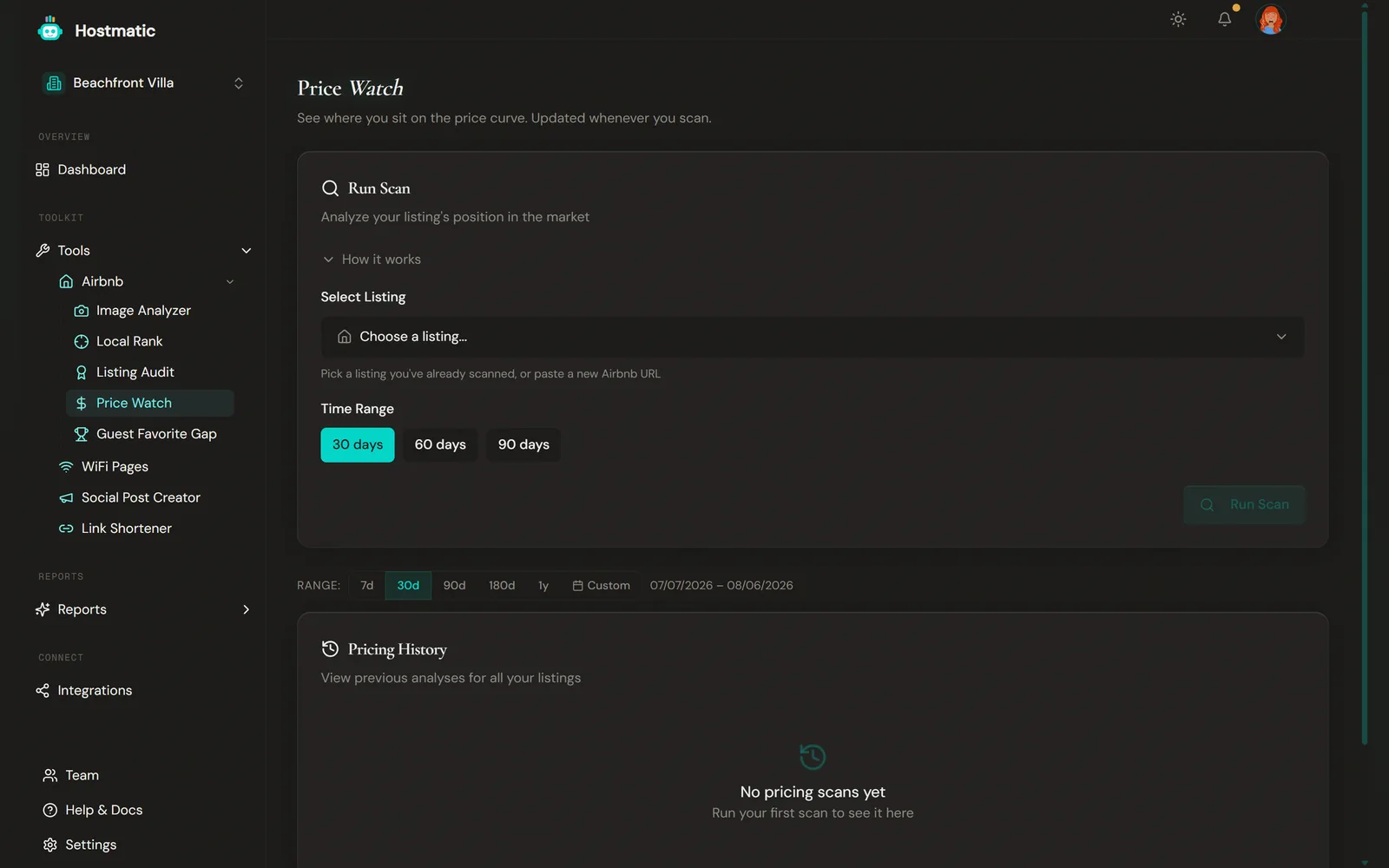
1. Pick a Listing
In Select Listing, choose one of your connected Airbnb listings. To add a new one, click Add a new listing… and enter the Airbnb Listing ID or URL in the field that appears.
2. Choose a Time Range
Choose 30 days, 60 days, or 90 days. This sets how far ahead Price Watch may look for an open 3-night window to price. It starts about 5 days out and moves later only if your listing isn't bookable, so 60 and 90 usually behave the same.
3. Run the Scan
Click Run Scan. Price Watch searches for comparables, checks their nightly rates, and returns your pricing band plus the underlying distribution. Scans usually take a minute or two. You can leave the page; the scan picks up when you come back.
4. Read the Result
You'll see the Position Analysis card with:
- Your pricing band (Below Market / Low Quartile / Mid Market / High Quartile / Above Market) with a color-coded badge
- Your percentile and your gap from the market median ($ and %)
- Distribution chart marking P25, the median, P75, and your price
- Top Comparables — the 5 best-value comparables (rating per dollar), with rating, reviews, price, bedrooms, distance, and Airbnb links
Banners above the result flag anything that changes how you read it — for example when your listing has a minimum stay longer than 3 nights, or when the check-in date had to be pushed later.
Override the detected price
If the scan can't read your rate (or reads it wrong), open the price-override panel on the result, enter your real nightly rate, and it recomputes against the same comparables. It's free within an hour of the scan, and it opens by itself when no bookable window was found. Listings with a long minimum stay aren't supported by the automatic check — use the manual price.
Credits
| Operation | Credits |
|---|---|
| Price Watch scan | 2 |
On the Free plan, the first scan of each listing is free. Scans that fail are refunded. Re-running with a manual price within an hour of a scan is free.
If a scan finds no bookable window, that listing is locked for 24 hours ("Try again in N hours, or enter a price manually now"). There's also a daily scan quota that resets at UTC midnight.
History and Notes
The Pricing History table on the landing page lists each listing you've scanned, with its latest price, percentile, and band. Use View History to open the listing, or Rescan (two clicks — the second confirms the 2 credits) to run a fresh check.
In the listing view, Snapshot History lists every scan with your price, the median, your percentile, and an optional note you can edit inline. You can delete a snapshot from the same row.
A date-range filter on the table is capped by plan: Free 90 days, Weekend 180 days, Pro 1 year.
The listing view also has a Price vs Market chart — your price and the comparable median over the last 90 days of scans. Useful for spotting when the market shifted and you didn't.
How to Use Price Watch
- Run it monthly during peak season, quarterly otherwise. Comparable markets move slowly.
- Stack it with Listing Audit. If you're in Mid Market but bookings are slow, the bottleneck is probably your photos, title, or amenities — not your price.
- Don't chase the median. If your reviews and photos are stronger than the comparables, you can sit in High Quartile and still convert. The band is a starting point for a decision, not a target.
Tip: Use scan notes to record why you changed price. Three months later you'll thank yourself when the trend chart shows the booking impact.
Common Questions
- "None close enough to fairly compare against" — no similar listings within 10 km, or none priced within ±50% of yours. Credits are refunded. Enter your rate manually to compare, or try again later.
- "Limited sample" badge — fewer than 5 comparables were found, so the percentile is less reliable. Under 10, you'll also see "Need more nearby listings to give you a confident comparison."
- Does it consider seasonality? — Each scan prices a 3-night stay a few days to a few weeks out, so it reflects whatever seasonal pricing your comparables have set for those dates.